

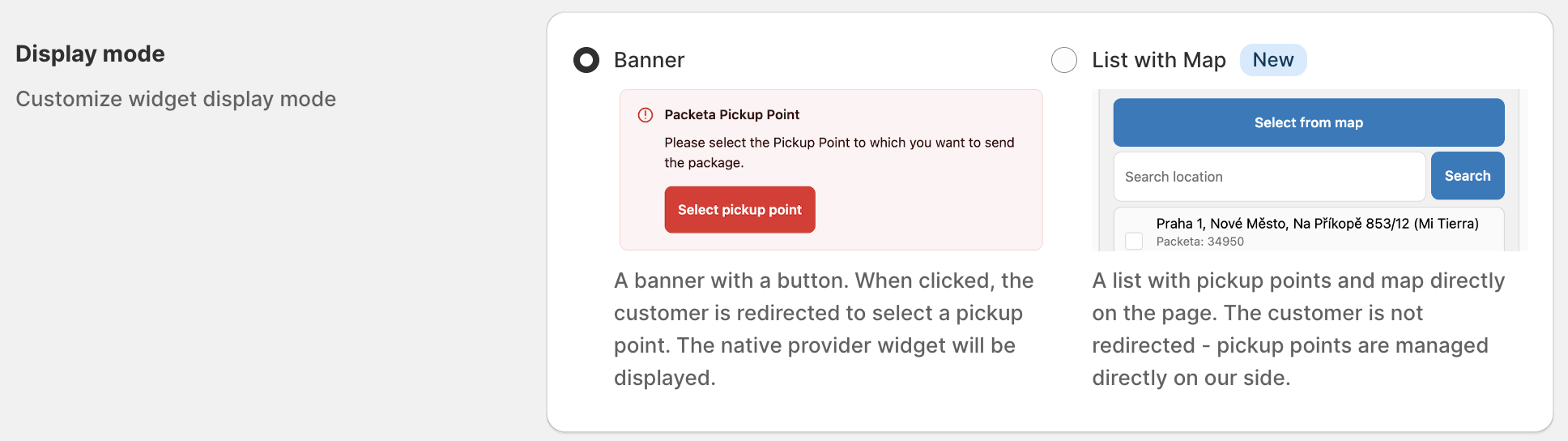
The pickup point widget on the Thank you and Order status pages has two display modes: Banner and List with Map. The setting applies only to these two pages. The checkout widget on Shopify Plus always shows the list with map, and the cart widget has its own settings.
Compare the modes
Banner
The customer chooses on a separate page that opens from the Select pickup point button, on the courier's own map.
Couriers: Packeta, DPD, PPL, GLS and Balíkovna only.
Exclusion (hide pickup point types or networks): not available.
Customer texts: editable for every store language.
Default for stores without Shopify Plus.
List with Map
The customer chooses directly on the Thank you or Order status page, from ShipDock's list with search. No redirect.
Couriers: all couriers with pickup points in ShipDock.
Exclusion (hide pickup point types or networks): available.
Google Maps key: optional. Without it, customers get the list and search, only the map button is missing.
Customer texts: built in, not editable.
Default for Shopify Plus stores.
Before you start
Switching the mode needs a paid ShipDock plan (Lite or higher). Without one, both options are greyed out.
If you use a courier other than Packeta, DPD, PPL, GLS or Balíkovna, choose List with Map.
Change the display mode
In ShipDock, open Settings → Widget (Pickup points).
In Display mode (TY / OS page), choose Banner or List with Map.
Click Save. The Thank you and Order status pages use the new mode from then on.
If you chose List with Map, add a key in the Google Map APIs card on the same page to show the Select from map button.
Key setup: How to get a Google Maps API key for the pickup point map.

Exclusion needs List with Map
To hide pickup point types or partner networks (for example parcel lockers), open Providers → your courier → Pickup points → Exclusion.
You can change the switches only while the display mode is List with Map. With Banner, the table is locked and shows Go to Widget settings.
Banner shows the courier's own map, so your exclusions don't apply to it.
On Shopify Plus, exclusions also apply to the checkout widget. To edit them, keep the display mode on List with Map.
The cart widget's Pickup point exclusions are a different setting: they list products that cannot go to a pickup point.
Texts and languages
Banner: open Settings → Translations, tab Thank you / Order status page - Banner widget, and edit the texts for each store language.
The Banner texts are Error message, Selected Pickup point title, Selected Pickup point description, Unselected Pickup point title and Unselected Pickup point description.
If you add a language to your store later, click Resync languages.
List with Map: the texts follow the customer's checkout language: English, Czech, Slovak, Polish, Hungarian, Croatian or German. Customers in other languages see English.