

Connect Packeta to offer its pickup points, Z-Box lockers and home delivery and to create Packeta labels, if you ship from CZ, SK, RO, PL, HU, SI or DE.
Before you start
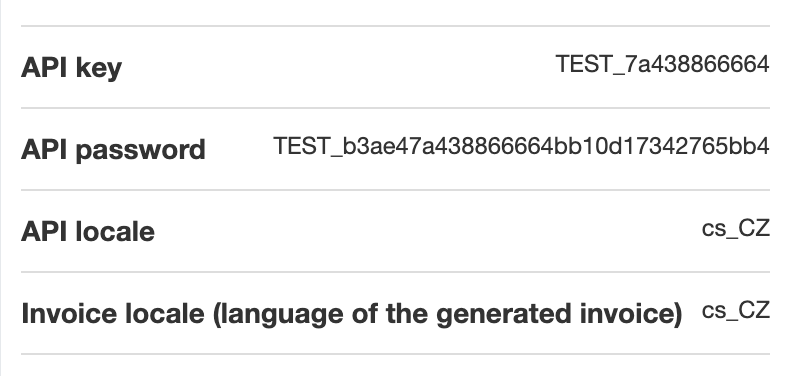
API key and API password from the Packeta client section, User support.
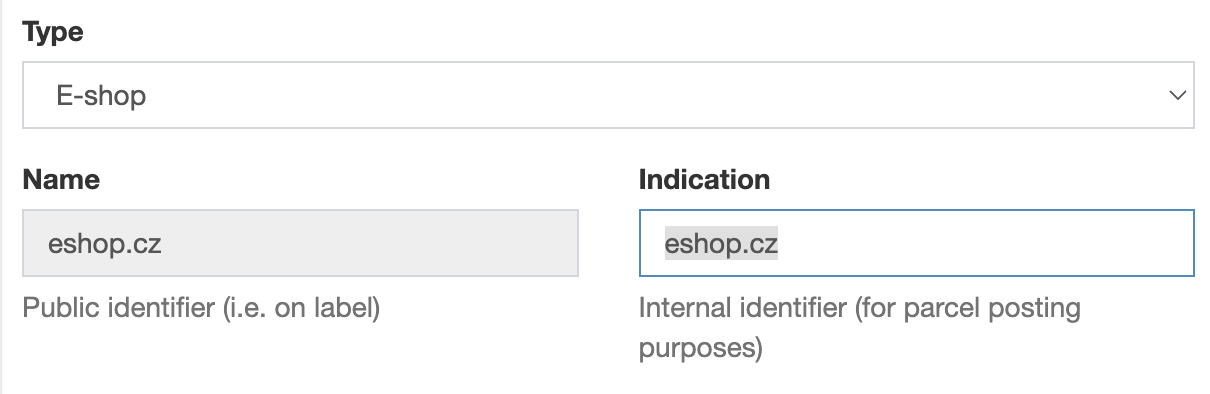
The Indication of your sender from the Packeta client section, Senders.
Plan: Lite to show Packeta pickup points, Full to create labels and customs declarations.
Connect Packeta
Open Providers, click Create provider and choose the country you ship from.
On the Packeta card, click Select (Zásilkovna is Packeta's Czech name).
On the General tab, in the Connection card, turn on Connect provider throught API.
Enter API key, API password and Default indication sender.
In the Status panel, choose Active and click Save.
Then set up the rates on the Pickup points and Home delivery tabs: see How to set up shipping rates.
For pickup points in the widget only (Lite plan, no labels), you can leave Connect provider throught API off.
Optional settings on the General tab:
Additional Senders: click Add additional sender, enter the Indication sender and choose the destination countries (Shipping address - Country code). Matching orders use this sender.
Consignment code for Z-BOX drop-off: see How to drop off Packeta packets in a Z-BOX with the consignment code.
Services
Home delivery: 32 countries through Packeta Home and partner carriers. Pick the carrier for each rate, for example CZ Packeta Home HD or DE Hermes HD.
Pickup points: Packeta pickup points, Z-Box lockers and about 50 partner networks, for example InPost Paczkomaty in Poland.
Exclusion card on the Pickup points tab: hides Packeta Parcelshop, Packeta box or partner networks. Works only with the List with Map display mode.
Outside the EU (CH, GB, IL, UA, US, AE, TR): see How to ship Packeta parcels outside the EU from Shopify.
Cash on delivery
COD depends on the Packeta carrier that delivers the parcel. Check it with Packeta before you offer COD.
Home delivery: CZ, SK, HU, RO, PL, DE, AT, IT, ES, PT, GR, HR, SI, BG, EE, LV, LT, but not with every carrier (for example not AT DPD HD).
No COD to NL, FR, IE, FI, BE, SE, DK, LU or outside the EU. Some partner pickup networks refuse it too, for example Hermes pickup points in Germany.
ShipDock rounds CZK to whole crowns and HUF up to a multiple of 5. A value in Edit order → Override COD value is sent as typed.
What works
Home delivery: Yes
Pickup points: Yes
COD: Yes, paid out to the bank account in your Packeta account
Mark COD as paid automatically: Yes, where COD is accepted
Cancel from the app: No
Test mode: No
Age check 18+: No, currently unavailable
Insurance: Yes, Edit order → Override insurance value
Extra services: Signature (FR Colissimo HD, FR Colis Privé Direct HD), Open (BG Speedy HD), per rate
Label formats: PDF A6, A6 on A4, A7, A7 on A4, 105x37mm on A4, A8 (and A6 with packing slips)
Limits
No test mode: every label you create is a real packet.
Deleting a parcel in Orders removes it only from ShipDock. Cancel the packet in the Packeta client section.
A COD order to a country or carrier without Packeta COD is still sent with the COD amount. Set Override COD value to 0.
Verify age when dispensing (18+) on an order is not sent to Packeta.
Partner carrier labels are A6, even if you choose a smaller format.
Troubleshooting
I don't see the Packeta card. Older Packeta stores use the original setup. Contact ShipDock support to move your store to Providers.
The Pickup points and Home delivery tabs are greyed out. Fill in API key, API password and Default indication sender, or turn off Connect provider throught API.
Packeta rejects a packet. See Packeta: common errors and how to fix them.
For errors that apply to every courier, see How to connect a courier.